Showing posts with label Google. Show all posts

Tuesday, 21 May 2013

Is the ASUS MeMO Pad a Tablet that's Worthy of being a Travel Partner?

I bet you might not have gotten the chance to have heard of the brand called MeMO PAD. Asus is the builder of this new tablet and with the Google Nexus Tablet under Asus' belt, there are many expectation with regards to this new release. Let's go over some of the things that I feel would be most important for your decision.

Design

The overall look and feel of the MeMo Pad seems to have gotten its roots from its Asus Google Nexus 7 counterpart, especially with how the textured back was designed. The main difference that one would notice though is that with the Nexus 7, you'll get a soft touch material coating as compared to the hard plastic feel of the MeMO Pad. The MeMO Pad also comes in multiple colors which include black, white, gray, and cherry pink. 


The ASUS MeMO Pad measures 7.7 x 4.6 x 0.4 inches and weighs 12.5 ounces. This makes the MeMO Pad tablet slightly larger and heavier than its Google Nexus 7 counterpart. 

The MeMo Pad's power button and volume controls are located on the top left edge of the device, with a headphone jack at the top and a microUSB and microSD slot on the bottom. The ASUS MeMO PAD tablet has an expandable memory. The speaker is located on the back, an inch-wide grille on the bottom left.

Display

The screen resolution on the MeMO Pad, 1024 x 600. This falls short compared to the competition. The Google Nexus 7 has a 1280 x 800 pixel displays, providing crisp and clear text and images. 

The screen limitations were especially apparent when we were browsing several different websites. Smaller text was harder to read than on the Google Nexus 7. Viewing angles tend to be a bit limited, making it difficult to see content clearly.

Audio

You would be happy to hear that we were pleasantly surprised by the audio quality of the ASUS MeMO Pad. It played loud and clear music during playback and it makes it quite a good alternative to bringing portable speakers when traveling. 

The MeMO Pad's speaker is enhanced by SonicMaster Audio Technology and the Audio Wizard app, which includes preset audio levels for different categories of media. 

Keyboard and Interface

The main advantage of the ASUS MeMO Pad is that it runs Android 4.1 Jelly Bean, which includes features such an enhanced notification drawer and a series of performance enhancements dubbed "Project Butter" which allows for an extremely smooth user experience. 

The ASUS MeMO Pad includes has two keyboards to choose from. These are the Android keyboard and the ASUS keyboard, although additional keyboards can be installed through Google Play. The ASUS keyboard, which has light gray keys against a darker gray background, features a full number row along the top, and has slightly more space between each key than its Android counterpart. 

Both keyboards support voice typing, but the ASUS keyboard requires Internet connectivity, whereas the Android keyboard works offline. Users can also input text using Google voice typing, which also works without an Internet connection. Though in a general sense this feature would most likely be left unnoticed by the general user. 

Apps

ASUS MeMO Pad tablet has a been nice enough to only put in features that can be considered as useful and not flood the unit with too much bloatware.  There is SuperNote, which a scribbling and note-taking app, the MyPainter drawing app, ASUS Studio for managing and editing photos, Zinio and MyBitCast for syncing notes with your ASUS WebStorage account. ASUS also includes App Backup, App Locker, ASUS Story and Studio and the BuddyBuzz chat client.

Another great thing to take note of about the ASUS MeMO Pad is that it also has access to the Google Play store, which currently contains a countless number of applications that one can download and use. The MeMO Pad also includes Floating App, which allows certain applications, such as the browser, video, a stopwatch and certain settings, to be displayed as a floating window on top of the currently running application. This feature I find quite neat and have found it quite useful when multitasking is needed.  

Performance

Here is where things get a little tricky for the ASUS MeMO Pad. One thing that you have to keep in mind is that the ASUS MeMO Pad is built for Media Consumption and not for games that contain heavy graphics. The reason for this is that the ASUS MeMO Pad only uses a single core 1-GHz VIA WM8950 processor with 1GB of RAM. I personally would have wanted double the core at least or double the RAM. It is here that you'll get to notice a slight lag in terms of transition effects such as going from portrait to landscape mode. 

The MeMO Pad has three power settings, Performance, Balanced and Power Saving. If you wish to have your applications to load faster, such as a game like Angry Birds, you'd have to keep it at Performance. Placing it at Power Saving could have you on wait time for much longer than you would want to. 

One thing that surprised me if anything was that the graphics looked great and played flawlessly with "Riptide GP." But, there was a delay between tilts and the in-game steering, which made the vehicle quite a challenge to handle. Games like Angry Bird and Fruit Ninja all played quite smoothly. 

Webcam

The ASUS MeMO Pad is equipped with a VGA Front Facing Camera (.3MP). This is pretty ok for webcam applications like skype. Just bear with the slight yellow hue and some rather apparent resolution issues. 

Battery Life and Wi-Fi

With continuous use the ASUS MeMO Pad has the capacity to last a little over 6 hours to 7 hours, much less though if you are watching movies and playing somewhat high graphic games (at least those that can run on the provided specifications). 

Verdict

The ASUS MeMO Pad Tablet is an OK tablet as a travel companion for three simple reasons:

1. Its cheap and easy to pack
2. It can be an awesome Multimedia Companion - from eBooks to Sound Blasting your boredom away.
3. Its on Jelly Bean giving you a somewhat buttery smooth performance. 

Right now the ASUS MeMO PAD is selling at less than Php 6,000. Though do check out other retail outlets such as those in Greenhills in San Juan, Philippines and St. Francis Square beside Megamall. 

If you ask me personally though, I would check out the Cherry Mobile Tablets first prior to making a choice on this one. You might have to decide on what you can afford versus specs.

Till Next Time...

-Metz

Tuesday, 30 April 2013

Samsung Galaxy S4 Now Available in Metro Manila

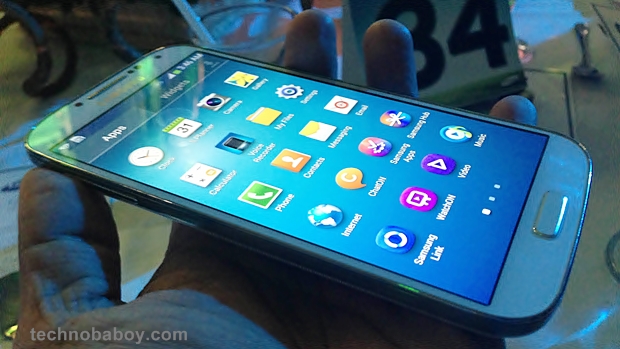
Samsung just released the Galaxy S4 International version in the Philippines.  It is quite known by now that when the Samsung Galaxy S4 was launched globally, there were two variants of CPUs that were announced that was to be used - one is the 1.6GHz Exynos 5 octa-core CPU and the other one is the 1.9GHz quad-core Snapdragon CPU.  It seems that the Philippine version of the Samsung Galaxy S4 will be powered by a 1.9GHz quad-core Snapdragon CPU.   The Samsung Galaxy S4 is starting at the retail value of Php 30,990. This is going to be quite a competitive price for all those wanting the best in Smartphone technology. Not even the iPhone 5 can compete at this level as retail variants of the iPhone 5 have it at around Php 36,000 to Php43,000.

Here are some of the key features of the Samsung Galaxy S4:


Samsung Galaxy S4 Specifications:
  • 5-inch full HD 1080p Super AMOLED Display (1,920 x 1,080 resolution, 441 ppi)
  • 1.9GHz quad-core CPU
  • 2GB of RAM
  • 16GB internal storage
  • microSD card slot (up to 64GB)
  • Android 4.2.2 Jelly Bean
  • 13-megapixel rear camera
  • 2 megapixel front camera
  • 2,600mAh battery
  • LTE
  • Wi-Fi a/b/g/n and WiFi 802.11ac
  • IR LED
  • Bluetooth 4.0
  • NFC
  • GPS/Glonass
  • Dimensions: 136.6 x 69.8 x 7.9mm, 130g
I am pretty excited to get to see how the Samsung Galaxy S4 performs in the local markets. The word is that there are already many that have made pre-orders via the local networks. How people find it after is something am curious to find out. If you have gotten a hold of the Samsung Galaxy S4, I would like to get to hear your thoughts about it and if it is really living up to its name as your "Life Companion"

Till Next Time...

-Metz- 

Budget Android Smartphone of Choice: The New Cherry Mobile Hyper

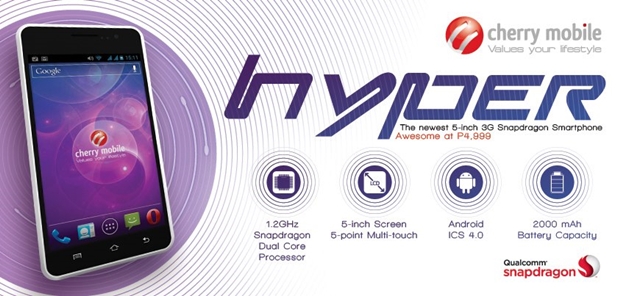
There are so many things that one can expect from the local branded mobile phone maker Cherry Mobile. With their latest release called the Cherry Mobile Hyper, you are given something that can be considered mid-ranged in terms of specs but extremely cheap in terms of pricing.  At P4,999 the Cherry Mobile Hyper is Cherry Mobile's cheapest Android phone of its class.


The Cherry Mobile Hyper sports a 5-inch display, a 1.2GHz a dual-core processor, 512MB of RAM, 4GB internal storage expandable via microSD, 5-megapixel rear camera, VGA front camera and 2,000mAh battery.  

One of the downsides to Cherry Mobile's phablet phone is that it uses an 800 X 480 screen resolution thus you could almost make out the individual pixels. Camera is pretty much the same as that of the Cherry Mobile Titan, thus it is important to always have ample lighting to avoid getting too much of a grainy feel to your photos. 

The Cherry Mobile Hyper will run on on Android 4.0.4 Ice Cream Sandwich.  There’s no word if a Jelly Bean update is available in the future.

Cherry Mobile Hyper Specifications:
  • Dual SIM / Dual Standby
  • 5-inch capacitive display
  • 1.2GHz dual-core Qualcomm Snapdragon processor
  • Android 4.0 (Ice Cream Sandwich)
  • 512MB of RAM 
  • 4GB of internal storage 
  • microSD support up to 32GB
  • 5MP camera 
  • VGA front camera
  • 3G/HSDPA 
  • Bluetooth 
  • Wi-Fi 802.11 b/g/n / Wi-Fi hotspot
  • FM Radio / Multimedia Player
  • 2,000mAh battery
The Cherry Mobile Hyper will be available in black and white colors.  If this is the phone you are currently using, I would love to get to hear more about your user experience and share any tips that you might have here. If this is something that one can be quite Hyper about, I guess that is entirely up to the user. Tell us what you think.

Till Next Time...

-Metz-

Sunday, 28 April 2013

Top Complimentary Apps for Instagram

I have been playing around with Instagram for quite some time now and I just love the way the filters bring to life photos that one would take with their camera phones and transform it into SLR like shots. But with continued usage I have often found myself wishing that there were more things that I can do to further personalize the photos that I am taking and sharing. Thankfully, there have been a lot of developers that have answered to this need and to help all of you that are as interested in enhancing your Instagram Photo experience, check out the following applications:


Photo Taken from LegoLand Malaysia edited with Snapseed and Pixlr Express

Create a Grid of Photos:

Effects:

Lens Boost:

Now when you go off to that wild adventure you have a full armament of things you can do with your Smartphone as you snap and share away the memories. These applications with my HTC One X, makes some pretty awesome pictures like the one below:


Cheers!!! :D

Till Next Time...

-Metz-

Monday, 22 April 2013

Best Windows 8 Like Launcher for Android Smartphones

I have had the time to go through a lot of different Windows 8 Live tile launchers and many if not almost all had failed to function like the actual Windows Live Tile System. That is until the Launcher 8 was introduced into the Google Play Market. Now with 24, 000 user downloads and at an average rating of 4.5, this new Windows 8 Launcher is proving to be quite a good alternative to those that are bored with the regular Android Feel and are craving for something simplified with a Windows Live Tile feel.

Curious? Here are some of the key features of this amazing WP8 Launcher:

- You can add different size tiles;
- You can add a variety of color tile;
- You can save and restore the theme;
- You can edit the start screen layout;
- You can set the current background style;
- You can switch the application list style
- You can add Android widgets in the tiles;
- You can set the wp8 style lock screen and status bar;
- You can select more than one hundred kinds of theme colors;
- You can add special features tiles,like time ,pictures and contact photo.
Reminder:
1 shows the live contact needs to read the contact data access permission;
2 add a shortcut when direct dial call authority need the android.permission.CALL_PHONE ;
3 add send SMS shortcut operation message need permission.
Here are sample Pictures of the interface that is amazingly highly customizable:


Though there are some bugs it still proves to be one of the best new launchers out there and the really good thing about it is that the developer is allowing people to download and use it for free, that doesn't mean though that they wont stop developing and improving it. Based on the user feedback I have found that there have already been several improvements by the time I got to use it and that the developers are constantly working on getting to hit it just right. I personally have moved over to using this launcher over my Sense 4+ on my HTC One X and though some have complained of battery drain, I haven't noticed anything above the ordinary at least in the battery department. I think I'll be keeping this till HTC Sends over the updates for HTC Sense 5 with Blink Feed. 
Overall, this is a must try launcher for all of you that are tired of the User Interface that came pre-installed in your Android units. Do remember that this is still being developed further and may take some tweaking of the settings to get things right. The great thing about it is that this allows you to customize it as much if not more than what Windows Phone 8 allows its user giving it a truly more personalized feel to your phone. Even the lock screen is exactly the same way as that of the Windows Phone 8.
Here's a screenshot of how I have customized mine to my personal taste:

Here is the link for Launcher 8
Till next Time...
-Metz-

Sunday, 10 March 2013

Philippine Salary and Taxes Calculator Application

If you are someone that wants to check out how much you'll be getting each paycheck after all the tax deductions check out this cool Tax Calculator application.

Tax Calculator is a useful tool for computing your monthly or semi-monthly tax of your salary. This tool also computes for your net salary as well as basic deductions. 
Based on experience it does pretty well and is only slightly off by a few pesos. It also is a pretty good tool to compute on how much you'll be getting if ever you are applying for a job and all they indicate is your gross salary. 


The Tax Calculator is pretty easy and straight forward to use. Simply plug in your salary and let it do the rest. 

Overall, I personally love the Tax Calculator application as it is straight forward and does exactly what it says it is meant to do. It simple and easy to use and it is pretty much accurate with the way it computes for your net salary. Not very many salary applications are out there that can do exactly what this can at least for those working in the Philippines. 

Till Next Time...

-Metz- 

Tuesday, 5 March 2013

Budget Table to Beat: Cherry Fusion Bolt Lives Up to Its Name

Cherry Mobile has just launched their very first quad-core powered 7-inch tablet called Fusion Bolt. The specs are quite similar to that of the Ainol Novo 7 Venus tablet with a slight difference in build quality. The display resolution is also quite good at a 1280 x 800 and uses an IPS panel for a 178° visibility angle. What was eye catching though was its ridiculously low price of 3, 999

Equipped with a 1GHz quad-core processor with 1GB RAM and 8GB internal storage. The processor is exactly the same as that of the Ainol Novo 7 Venus which is advertised at 1.5GHz, though the Cherry Mobile Fusion Bolt has it underclocked at 1.1Ghz.

The one thing I did notice was that going through the UI, there is a negligible amount of lag from time to time considering that it is running on a quad core processor. Temple Run 2 type games run quite smoothly on the device, but Contract Killer Zombies 2 tends to lag a bit. 

The 8GB memory was used to cut down on cost however this shouldn't a problem as the Cherry Mobile Fusion Bolt tablet has a swappable microSD slot anyway. Other slots include a microUSB slot which they said can run 3G dongles, and a mini-HDMI port.

Rear camera is limited at just 2-megapixel and the front one is a 0.3-megapixel affair. This is something that one shouldn't put too much interest in as it tends to be quite grainy and performs quite poorly in low light situations. Considering the price tag this can be a forgivable thing. The Front Camera though performs quite well, just ensure you are in a well lit room lest you want your webcam image to look like a silhouette.  Battery is 4000mAh which should last the device roughly about 5 hours of heavy usage considering that it is running an IPS Screen and is running on quad core tech,

Overall, the device is a good device for people that want the best of quad core technology but are only willing to dish out Php 4,000 pesos. I can see though the educational benefits that this device can bring to families that want to have their kids to experience the full privileges of modern technology without having to dig deep into your pockets. 

Cherry Mobile Fusion Bolt Specs:
7-inch IPS LCD HD display (1280 × 800 resolution), 216ppi
5-point multitouch display
1.0GHz quad-core Actions Semiconductor ATM7029 processor
Vivante GC1000+ GPU
1GB RAM, 8GB internal storage, microSD up to 32GB
WiFi 802.11 b/g/n
2MP rear camera
0.3MP front camera
Supports external 3G dongle
miniHDMI
Android 4.1 Jelly Bean
4,000mAh Li-Ion battery
186.2mm x 126.9mm x 10.8mm
320 grams
SRP: Php3,999

Till Next Time...

-Metz-


NextBook M805ND - Best Buy 8 Inch Tablet

If you are currently looking for a tablet that is at the 8" category but aren't quite ready to dishout a hefty lumpsum of what one would normally spend for an iPad Mini, then the NextBook 8" (M805ND) is you next best thing. This is a fully featured 8" tablet that is powered by Google Android's 4.1 Jelly bean OS and comes equipped with so many features that'll make you feel that spending the Php 7, 495 on it was well worth it. - For those that are interested in buying this you can check it out at SM Nort Edsa Department store.

Features:
AML8726-MX Dual Core and Front Camera
NEXT8D12F is equipped with AML8726-MX Dual Core CPU and its main frequency up to 1.5GHz. You can surf the net, play games, or stream videos smoother than ever! It also comes equipped with 0.3MP front facing camera to capture that special moment wherever you are!

Capacitive Touch Screen and BT 2.1
NEXT8D12F Dual-core comes equipped with a 8 inch capacitive touch screen for smoother operation. With resolution of 1024x768 pixel, you can be sure of the crispy. Moreover, it is built-in bluetooth 2.1, which enables you to transfer and share your precious things with your friends or colleagues anytime and anywhere.

8G ROM & WIFI & MicroSD Card Compatible
NEXT8D12F Dual-core comes with built-in WiFi 802.11 b/g/n, you can surf the World Wide Web faster than ever. Your new Next8D12F Dual-core is also equipped with 8GB memory, which can also supports up to 32GB with Micro SD card slot.

Google Android OS 4.1
The NEXT8D12F Dual-core is preloaded with the Google`s powerful Linux-based Android operating system 4.1 designed specifically for mobile devices. You can play, listen and surf and never miss a beat!

Overall with ML8726-MX Cortex A9 Dual Core 1.5GHz, Nextbook NEXT8D12F Tablet PC is much clearer and better to use. It uses the Google Andriod 4.1 OS and 8GB nand flash. The camera is 0.3MP. With its 8 inch digital high-definition LCD screen and the capacitive touch panel, you can enjoy a more splendid life. 

Specifications: 

Model NO.:Nextbook NEXT8D12F 
Operation System:Andriod 4.0.4 updated to 4.1
CPU:AML8726-MX Cortex A9 Dual Core 
Frequency:1.5GHz 
Screen:8" High Light TFT 1024*768 Resolution?Capacitive Touch Panel 
RAM:1.0G DDR3 
Nand Flash:8.0GB 
Micro SD,TF Card:Up to 32GB(No Card Includes) 
Camera:0.3 MP 
Bluetooth:Support 
Audio:Support MP3,WAV,OGG,FLAC,APE,AAC,WMA?license? 
Video:Support AVI,3GP,MP4,RM,RMVB,FLV,MKV,MOV,MPG,VOB,DAT,WMV,ASF 
WiFi:Support WiFi, 802.11b,g,n 
3G Dongle:Support 
Image Format:Support JPEG,BMP,GIF,PNG 
E-Book:Support Epub,TXT,FB2, RTF 
Read Speed:30~31MB/S(MLC flash) 
Write Speed:4~5MB/S(MLC flash) 
Gravitity Sensor:Support 
HDMI:Yes 
OTG:Support Mouse,keybord,uDisk 

Other Applications:Apk installer/ASTRO/Browser/Calculator/Calendar/Camera/Clock/Downloads/Email/Ebook/File Browser/Gallery/HDMI Switch/Office Suit/Search/Settings/Slide Me/Sound Record/Task Killer/Weather Forecast (optional),Recording 
Language:English,Chinese(China),Chinese(Taiwan) 
Interface:Micro SD Card 
USB Interface 
3.5mm Earphone Interface 
Color:Black 
Power Adapter:US Plug AC100/240V 50/60HZ DC 5V/2A 
Battery:Li-polymer 4720mAh 
Battery Time:Use to Listen Music:about 6-hour; Use to Watch Video: about 5-hour 
Use to browse:about 5-hour

Till Next Time...

-Metz-

Tuesday, 12 February 2013

Ramos Blue Devil W30 HD - Best 10" Budget Tablet

I am quite a big fan of budget tablets from brands that are not popular in the mainstream market. Ainol being one of them, as they have released tablets that have specs that are just quite amazing. Following the launch of their 7" Android Tablets, Ainol Novo 7 Venus, that rivaled even that of the Google Nexus 7 now have a ten inch tablet model that is worthy to compete even with Samsung's Tab 10.1 series minus that of the stylus.

EGL Marketing Corporation, the local importer of the Ainol tablet, has just officially announced the Blue Devil W30 Warlock. The Blue Devil W30 Warlock (also known as the Ramos W30 Warlock), is a 10.1″ quad-core tablet that rocks the SAMSUNG Exynos 4412 ARM CPU and the quad-core Mali 400 GPU. It’s the same quad core chipset that powers theSamsung Galaxy S3.

Here are the specs


  • Quad Core Samsung Exynos 4412 
  • quad core mali 400 gpu 
  • 10.1 inch 1920 x 1200 ips screen 
  • 2gb ddr3 ram 
  • 32gb internal memory 
  • 10.1 inch android 4.0 ics aluminum shell built 
  • exp to 32gb micro sd bluetooth enabled 
  • 5400 mah li-on dual camera 0.3 front 2.0 rear
  • Php 14,999.00
I still have yet to get a chance to get to do a full review of the tablet as I haven't gotten my hands on a test unit but just basing it on the specs alone that practically comes from the same specs that powers the Samsung Galaxy S3 plus 2Gb of RAM and 32 GB of internal memory I am pretty sure you won't get disappointed with this tablet at all. Though the only points that I would most likely put scrutiny on with this would be it's camera, but the battery and build are pretty good trade-offs. Added to the ability to use  an external memory card of 32GB you are sure to have no issue with the amount of applications and files you can save in this 10" tablet monstrosity.

Till I get the chance to fully review the Ramos Blue Devil W30 HD, we have to rely on the spec sheets released by Ainol for the meantime. I'll update this article with a full review by the time I get to play around with the device first hand. In the meantime, if you have any experience with this device, I would most strongly request to share your experience with it right here at the comments field.

Till Next Time...

-Metz-

Starmobile Flirt: Best Budget Camera Smartphone Powerhouse

Starmobile has unveiled another Android smartphone up only for a limited time, the Starmobile Flirt. It's a 4.5" qHD smartphone running on Jellybean and has an awesome 12MP rear camera with BSI (backside illumination sensor/ back-illuminated sensor).

What I feel is amazing about this budget phone is that it uses BSI sensors that really help with illuminating the photos even under low light conditions. With Android's Jelly Bean OS and its dual cpu core processor, the unit is sure to run smoothly at least more or less with basic functionalities. RAM size could cause a bit of a glitch from time to time especially with heavy graphics and gaming, but it shouldn't be an issue for games like Angry Birds and Temple Run. 

With it's price point starting at around Php 9,290 and in hues of Ultra Blue and Ultra Red this unit is by far quite an eye candy. Starmobile is even throwing in a free screen protector and and a memory card. 

Here's the full specs:

  • 4.5-inch qHD display (540 x 960) @ 245 ppi
  • 1GHz dual-core MTK6577 CPU
  • 512MB RAM
  • 4GB internal memory
  • micro SD card up to 32GB
  • 12 megapixel rear BSI camera
  • 3 megapixel front-facing BSI camera
  • 3G
  • WiFi
  • GPS
  • Bluetooth A2DP
  • 1,700mAh battery
  • Android 4.1 Jellybean132 x 66.6 x 9.5 mm
  • Dual-SIM
Overall, I feel that this is a pretty solid device with a lot to offer those that are on a budget but wants a phone that doesn't sacrifice on picture quality. So all you cam-whores who wants the benefits of a good point and shoot device at a price point that'll leave you more room for spending on your looks than on the phone itself, this is a pretty tempting device to check out. Plus it pretty much uses Jelly Bean's basic skin so you won't have the hassles of over bloated software while enjoying the full benefits of Google's latest project butter feel and Google Now functionalities. 

Monday, 28 January 2013

Temple Run 2: Imangi's Next Big Mobile Gaming Hit

It is undeniable that Imangi has really made an impact on mobile gaming with their initial game launch called Temple Run. It revolutionized the runner class for mobile gaming and thus spark a new era in that particular niche. Many developers have worked on cashing in on the craze and have since then seen countless number of games that are themed in a similar way. Disney and Imangi have even teamed up and launched a special edition to the game called Temple Run Brave for the Animation Movie Brave, where the idea was pretty much similar to the Original Temple Run but with added tasks such as shooting targets with your arrows as you try to outrun the demon bear known as Mordu through the forest. 
Temple Run 2 is a fresh new out look on the game and Imangi has successfully made the Sequel just as entertaining if not more. Here's what one can expect from Temple Run 2.

Obstacles look similar but with a few new twists


While sticking to the basic principles of the original game, Temple Run 2 is yet again put in a scene where a daring explorer would be scurrying from cave while being chased by a mad demonic ape like creature that is out to gobble him up. The game starts off at an easy pace and eventually picks up speed the further you get into the game. You'll be tasked with collecting coins and power ups as you run, slide, jump, and ride miner carts down a tunnel to avoid various obstacles that are out to hamper your escape. 

 Using the device's Gyro and accelerometer, you can dodge obstacles by tilting your device to the left or right. Swipe gestures are still one of the key factors, and so is collecting gold coins. 

It is the new environment, that makes this game so much more entertaining, even if the gameplay is still essentially the same with the first Temple Run. The once dark and murky swamp has now given way to a picturesque mountain path that is reminiscent of The Great Wall of China. Here you'll find yourself sliding down ropes, swinging left to right collecting coins, jumping across fast moving rivers and waterfalls, skipping past broken bridges and sliding under temple ruins and over spiked booby traps and fire jets along the way. In the mines you'll be forced to ride the mining cart and tilt your way across perilous crossings and broken rails while ducking under broken mine shafts. 
Watch out for those power-ups and tricky miner levels


In the mines, you'll be riding a cart along a beaten track. You'll have to be quick on your wrist and reflexes as you need to lean and duck to collect coins and avoid obstacles or broken tracks. The wrong turn could leave you face first on a dead end or crashing to the unknown depths of the cave below. 

What has been quite a welcome feature in the game is the easy resurrection option which is available immediately after a mishap and costs a gem (collectible within the game) for the first save and two for the second and so forth. You also dont need to buy the head start upgrades as once you have enough coins, the option is readily available on screen as you start the game, without the need to buy in the store to get the upgrade like in the first Temple Run. Upgrades are available nonetheless from boosting the time limit on various options like the magnetic capture of coins or gaining protective shields, speed boosts etc. With 10,000 coins, you can even choose a new character to run. 
Upgrade your existing character or simply choose a new one


The further you get into the game the faster the pace gets and this is where things tend to become rather tricky. There can be some instances where you might think that the road continues up ahead but end up flying off the screen as that signals a dead end cliff hanger situation that you should swipe left or right to avoid.  

Overall, Temple Run 2 is definitely a well designed game, with the new elements making it quite fresh and appealing is proving to be a worthy successor to the original Temple Run Game. It has no issues in terms of gaming in both IOS and Google Android Devices and even plays more smoothly than the first. Best part about it is that it is free to download for both as well. 

Till Next Time...

-Metz- 


PS. I am curious as to how everyone is scoring on their Temple Run 2 Games :) Do post them here in the comment field, or if you have any tips on how to better play that game please do share them as well :) 

Review of HTC Butterfly: Is It Worth Buying?

The HTC Butterfly has finally made its appearance in the Philippines and many are asking if it is really something one should spend on. Many of those that have asked are current owners of the HTC One X and One X+ devices. Below is a full on review of what the HTC Butterfly has to offer and the overall verdict on whether or not the HTC Butterfly is worth your money. 


The Main Focus is Display
The HTC Butterfly isn't what I would call a new device as it was first introduced late last year around Oct 2012. A slightly modified version of this was also released in the US around late November. The Butterfly is basically what HTC markets internationally and works on 3G networks. 

The HTC Butterfly is a full HD display device, sporting a 5inch screen display with a resolution of 1920 X 1080. For the sake of comparison via numbers the screen boasts an incredible pixel density of 440ppi, among the highest on the market.  Apple's iPhone 5 has a pixel density of 326ppi while the Samsung Galaxy Note II offers 267ppi. It is pretty impressive though compared to that of the HTC One X, iPhone 5 and Samsung Galaxy S3 visually there is no noticeable difference making the pixel density only matter really in just paper.


Overall, the HTC Butterfly's color reproduction is excellent, viewing angles are superb and brightness is almost unrivaled. To appreciate this though one would have to see it in person. 

Improved Design
The HTC Butterfly will undoubtedly make a great first impression for those who are using it. The HTC Butterfly is mainly constructed from plastic, which is a far cry from the aluminium unibody designs they used to use but upon touch gives that very solid premium feeling compared to that of the Samsung Galaxy S3's plasticky feel.

HTC Butterfly has also included quite a number of accents on its design that adds to that overall premium feel to the device, such as the addition of the metallic-like glossy white finish of the back, thin edges that taper from the center of the device and HTC's micro-grill pattern edges along the sides. The HTC Butterfly is just about 9mm thick and is light weight, weighing in only at 140g. 

One of the things that I have found a bit awkward is the position of the power button which is top mounted in the center making it an effort to reach up to press considering the size of the unit. The micro sim card and microSD card slot is covered by a flap that is quit hard to open. The flap covering the micro usb port at the bottom is easier to manage, though technically I would prefer to do without these flaps as I find that they would have a tendency to fall off or break with continuous usage especially if one is not too careful. The battery is not removable, which is the sacrifice that HTC made for design and many that have been asking for this to be changed will be left disappointed.

HTC Butterfly Sense
The HTC Butterfly runs on the 4.1 Jelly Bean OS of Google's Android and on top of that uses the HTC Sense 4+ which is the same as that of HTC's ONE X and One X+. The sense UI is something more of a love-hate relationship for those that have used an HTC device and just like many others, your own personal preference will dictate whether this is one you'd like to use. 

The most advantageous thing about HTC Sense are definitely the widgets and many other graphic touches throughout the OS that isn't available on other Android UIs. If this isn't your thing there are many downloadable interfaces off the Google Play store that you can use to change the look and feel of the device without having to root your phone. In terms of performance, the Sense doesn't seem to impede the device in anyway which could be more attributed to the marriage of the hardware and software capabilities that the HTC Butterfly provides. 

The HTC Butterfly's Hardware
The HTC Butterfly's internals are pretty much the same as that of the Nexus 4 that has been released by LG and Google using Qualcomm’s Snapdragon S4 Pro 1.5GHz quad-core processor. It has a 2GB RAM, which is fast becoming a standard for quad-core phones. 

The HTC Butterfly isn't an LTE ready device which means you'll have to be satisfied with it running on HSPA and 3G networks but with its 2020mAh battery that should be a worthy trade off as LTE would most likely drain the HTC Butterfly's battery rather quickly. 

Gaming is definitely not going to be a problem for this phone, but I would most likely advice that you'd have to get the charger ready as any gaming with this device would most likely drain it quite quickly. 

The Camera is also pretty much the same in terms of specs and performance as that of the HTC One X series, which pretty much translates that you wont be disappointed at all in this particular department, though speaking from experience being an HTC One X user, it would be best to play around with the settings and camera options to get the most out of the Camera/Video Experience. 

Here is HTC Butterfly's Specifications:

  • Size: 143 x 70.5 x 9.08 mm
  • Weight: 140 grams
  • Display: 5-inch SLCD 3, Gorilla Glass 2, Full HD (1920 x 1080)
  • CPU: Qualcomm S4 Pro, 1.5GHz, Quad-core
  • RAM: 2GB
  • Storage: 16GB
  • MicroSD slot: yes, up to 32GB
  • Networks: HSPA/WCDMA, GSM/GPRS/EDGE
  • Battery: 2020mAh
  • Camera: back — 8MP, autofocus, LED, BSI, HTC ImageChip; front – 2.1MP (1080p)
  • Sensors: Gyro, Accelerometer, Proximity, Light
  • Connectivity: GPS+GLONASS, Bluetooth 4.0, Wi-Fi 802.11 a/b/g/n, DLNA, micro-USB 2.0


Overall, the HTC Butterfly is quite  decent device, but if have already bought the HTC One X, or the HTC One X+ this isn't going to be something I would advice you to switch too as the experience and performance that the One X devices have provided are pretty much at par with the HTC Butterfly minus the screen size. The 2GB extra RAM isn't as important either as the One X devices are still quite capable of holding their own in terms of gaming experience. If anything, I would recommend the HTC Butterfly to those that haven't bought HTC's ONE X devices as that would most likely be a major upgrade to your user experience. Aesthetically the HTC Butterfly is quite tempting and just like the One X models it'll be a good buy but if battery is going to be a major factor for your purchase then best to look somewhere else.

Till Next Time...

-Metz-


Sunday, 27 January 2013

Budget Tablet: Full Review of Kata T2 8" Tablet

With the success of their last year's model, Kata T1 7" Tablet, Kata has now released a worthy budget tablet successor called the Kata T2 which sports an 8" Full touch display and an upgraded cpu and gpu chip that makes gaming and browsing fast and easy. They also used Google Android's latest mobile OS the Android Jelly Bean 4.1.1, which makes Kata T2 quite a power house.

Here is the summary of it's specs:

Platform:Android v4.1.1 (Jelly Bean)
Dimension (H x W x D):203 x 153 x 9.9mm
Weight:445g
Display:8" Full-Touch Display (1024 x 768 pixels)
Processor:1.6GHz Dual Core
Quad Core GPU
Memory:Internal: 8GB (RAM: 1GB DDR3)
External: Support microSD card, up to 32GB
Color:Black
Camera:5.0 Mega-pixel Camera
2.0 Mega-pixel Front Camera
Support Format:Audio: MP3 / AAC / OGG / FLAC
Video: MKV / MPG / MP4 / AVI
Battery:Playback time: 10 hours
Standby time: 336 hours
Capacity: 4100mAh
Connectivity:Wi-Fi: 802.11 b/g/n
Bluetooth 2.1 + EDR
GPS
HDMI:Mini HDMI

The Kata T2 is quite a sturdy and well built device that one would most likely not think it cost roughly about $200. The Kata T1 was something that I would recommend as a buy for those wanting to give something special for their kids but now with the Kata T2 it is not hard to recommend even the power users to take a shot at this device and see how it performs.

In terms of display it pretty much rivals the display quality of that of Samsung Galaxy Tab 2 which makes it quite pleasant to look at though not as good as the screen quality as that of the Samsung Galaxy Tab 7.7. In terms of performance and speed, the Kata T2 really holds its own against the top brands and can play many of the high end games without a glitch and with Jelly Bean backing up its hardware, everything is as what Google promised of a machine that is fine tuned with their software, the Kata T2 is quite buttery smooth and pleasant to use.
The Kata T2 uses a roughly uses the stock Jelly Bean android so you'll be enjoying the full unadulterated experience of the the latest Android Software without much of the common bloatware you'd find on other tablets. Battery life it pretty much average lasting pretty much well over a day of moderate to heavy usage with its 4100mAh battery. It also has support for GPS making applications like MapFactor Navigation work extremely well.

In terms of camera, though it now supports 5MP which is quite an upgrade to the previous KATA T1's 2MP rear camera, the picture quality isn't something to be too ecstatic about, though with good lighting does dish out pretty decent shots and videos. The front facing camera though is quite a pleasant surprise with 2MP for video calling and those self-portrait shots most people love to take of themselves from time to time.

WiFi connection is also much better compared to the previous Kata T1, which I have to say isn't bad at all, just now this one is at par with most mid-range to high end branded tablet models out there.

Overall, the Kata T2 8" Tablet is quite an eye-candy both in and out and at the current price tag of $200  it is pretty tempting. Would I recommend this right off the bat? most likely it would be on the top three of the best budget tablet choices out there for the year. The only issue you might encounter is finding the right casing for it though there are many gadget accessory shops out there that I am sure can produce a pretty good option for the Kata T2, should you ever decide to purchase one. Again, if this is what you choose I would have no doubt that you'd love it from first glance.

Till Next Time...

-Metz-