Showing posts with label Samsung Galaxy Note 2. Show all posts

Sunday, 21 July 2013

Tips and Tricks: Optimizing Your Samsung Galaxy Note 2

I have gotten a lot of questions from friends about their Samsung Galaxy Note 2 and what things they can do to optimize their unit without having to root their phone. To help other people out as well, below is a compilation of things that I feel can help improve your Samsung Galaxy Note 2 experience. Also we have included some neat tricks just as an add on. (Should you have any suggestions or recommendations of how else the Samsung Galaxy Note 2 can be optimized without rooting, please share it with us at the comments section)

Touchwiz

Optimizing your Touchwiz experience

Samsung has included elements in touchwiz called animations for transitions between screens. This was done to make it look good, like how power point presentations would go from one slide to another. However, these transition can cause a slight hiccup and slow down your system. The best thing to do is to simply turn these off. Go to Settings >>>Developer Options>>>(Turn Off) Windows Animation Scale, Transition Animation Scale, and Animator Duration Scale. This should give you a snappier phone, but do take note that once you turn off Developer Options it all goes back to it's default setting. 

Screen and video

Bring the AMOLED Colors Natural

OLED screens tend to be quite over-saturated and can make a person's skin tone look somewhat unnatural. It does make the picture come out, but sometimes it makes it come out a little too much. We recommend to use Natural or Movie as your Screen Display Settings of choice. 

Use Third Party Apps for Video Playback
The Samsung Galaxy Note 2 has an incredible built-in media player, however there are some files that it can't handle such as those that are encoded as 1080p MKVs. To resolve, download a third party media application from the Google Play store such as the MX Player and you'll be able to overcome these issues. 

Screen too Dark?
The Samsung Galaxy Note 2 uses auto brightness as its default setting. This uses the sensors to judge the intensity of the screen depending on how much lighting there is. However, based on experience, this can falter and give you the wrong output causing you to feel that you have a dark screen. Simply swipe down to get the notification panel and slide the screen brightness to the desired amount. I usually have it at 50% for my day to day to keep the battery from getting too drained from on screen time usage. 

Battery life

Keep battery life riding high with auto management
Technically speaking, the Samsung Galaxy Note 2's battery is quite amazing. It can definitely last the whole day if not more. Samsung has however, included a power management mode that could help with keeping it optimized. You can find this at the Settings menu under Power Saving. It basically affects CPU speed, changes web browser background, and even turns off haptic feedback. There'll be obvious compromises though when this kicks in but it does help give your Samsung Galaxy Note 2 that extra juice.

Switch off unnecessary features
The best way to conserve power in any phone is to switch off features - such as mobile internet and Wifi when not in use. You can do this manually in the Samsung Galaxy Note 2, simply swipe down from the top to access notifications menu and toggle off the unneeded services or go to Settings and turn them off from there.

Reduce screen timeout time
Reducing screen timeout is a good trick to use to help conserve battery. This helps keep your phone from staying on screen for too long when not needed. In the Display Submenu in Settings you'll get an option to pick between 15sec to 10min. 

S Pen

Learn the Quick commands
This is quite an overlooked feature that can save time if learned. This allows you to launch any app or function on the phone with just a few simple flicks. To access quick commands, press the stylus button and swipe up. Simply draw your pre-determined character or symbol and the right app/function shall be launched.

Optical Character Recognition
The Samsung Galaxy Note 2 features excellent OCR, optical character recognition, and it's built into the Samsung keyboard. Simply pull out the S Pen and the keyboard area will turn into a little box for you to write in, whether you're writing an email, text or searching the web. The OCR is incredible at recognizing one's scribbles, though if you really write badly where even a normal person can't read what you wrote, don't expect the OCR to make magic there.

You can write and scribble on anything
The SPen allows you to make notes on anything on screen, which can be pretty useful for events such as meetings, social gatherings, and taking notes about a photo. Simply press down on the SPen button and lightly press on the screen till you see a flash. This takes a screenshot of what is on the screen and it is here that you can write your notes on. 

The S Pen Screengrabs
Press down on the SPen's button, draw a shape on the screen and whatever's on-screen within the shape will be saved as a screengrab.

Left handed
By default, the Samsung Galaxy Note 2 is setup for right-handed people, but there's also a mode for left handed people in the Settings menu. 

Interface

Full screenshots are easy
Taking full screen shots with the Samsung Galaxy Note 2 is pretty easy. Simply check if Palm Swipe Capture is activated in the Settings Menu under Motions. Once active you simply have to swipe your hand from right to left to capture the screen. Other method is to hold the home button and power key at the same time till the screen flashes. 

One Handed Operation
The screen of the Samsung Galaxy Note 2 can be quite bit but Samsung has included a one handed mode to help you use the phone with just one hand. It organizes the keypad, virtual keyboard, and unlock pattern screens. You can find this option in the Settings menu.

Customize with Widgets
Samsung has come a long way especially in the areas of customization, one where you can see the most of these is with the integrated widgets, however, there are other widgets that you can use and download off the Google Play store and it is worth checking which ones you'd find useful. My advice is get widgets for the apps and data that you most often use and need to reduce the need to browse around and launch the apps themselves. This saves both time and precious battery.

Storage

Expandable storage
Most of us are using the 16GB version of the Samsung Galaxy Note 2. This means you have only a limited amount of space for the apps let alone the movies, photos, and music. It is best to grab a microSD card to compensate for this. I would recommend to get the Class 10 microSD cards especially from Samsung to avoid any of the microSD card issues that are commonly posted by a majority of the Samsung Galaxy Note 2 users. If not try to buy your microSD card from a reputable store otherwise risk encountering damaged microSD card issues. 

Clean the cache
This is one that has to be of habit or have a good cache cleaner like Clean Master helping you out when you find yourself running low on memory. With Clean Master you can easily delete and clean cache and temporary files of apps you have installed. 

Contacts

Contacts from Facebook and Twitter
Downloading the Facebook and Twitter apps give Samsung Galaxy Note 2 users the opportunity to grab and sync contact information with your phonebook. This makes it easier for you to reach out and find people. 

Blocking Mode
In a meeting but don't want to be disturbed unless it is from your significant other? Samsung Galaxy Note 2 has a feature called blocking mode. This restricts notifications and calls coming from all but your chosen few. You can even set a time for it. 

Camera and Video

Use HDR mode in mixed lighting - or all the time
The Samsung Galaxy Note 2's 8MP camera is quite impressive, but when it comes to mixed lighting situations can prove to be quite a challenge when trying to get that perfect shot. In this situation, it would be best to activate the HDR mode of the Samsung Galaxy Note 2. This effectively combines multiple exposures in a single shot to bring out that extra detail in the shadow and literally light things up. Only downside to this is that HDR takes a little slower to process.

Try slow and fast motion modes
This is one of those overlooked features that could help enhance your videography experience. Found in the menus of the video camera, you can toy around with taking fast and slow motion video capture. This comes in quite handy when filming things like sporting events or recording your baby's first few steps. Only thing to remember is that you can't activate them while the video recording is on-going, you can only activate it from the beginning. 

Connectivity

Don't go over you allowance, with Data Usage
A staple Android feature is the Data Usage counter. This can be found within the Settings menu, and it monitors your data usage, showing it as a colourful graph. You can use it to cut off your mobile data connection once you reach a certain limit, to ensure you won't get charged by your carrier. 

S Beam
A feature introduced with the Samsung Galaxy S3, S Beam uses a mixture of NFC and Wi-Fi Direct to let you transfer files between compatible Samsung phones. You just need to tap the phones together to get them playing. S Beam needs to be switched on, though, from within the Wireless and Networks menu.

Overall, the Samsung Galaxy Note 2 is a pretty amazing device. It is highly customizable and for the most part it is capable of handling most if not all of what you throw at it. I have been pretty pleased with it's performance for the past couple of months that I have had it and I honestly will keep it around even long after the Samsung Galaxy Note 3 has been launched. With a little tweak here and there, just like everyone has noticed, the Samsung Galaxy Note 2 can and still continues to hold its own among the latest handsets of late. 

Again if you found any other tips and neat tricks with your Samsung Galaxy Note 2, I strongly encourage that you share it with us here. We would be more than appreciative of it as am sure will the others that find this page.

Till Next Time...

-Metz-

Tuesday, 21 May 2013

Samsung Galaxy Note N7000 Jelly Bean Review

Time to break from the temporary Hiatus from Sidestrip with a bit of good news. As promised, Samsung has released the latest firmware update for the Samsung Galaxy Note N7000 to the general public here in Asia, specifically the Philippines. They were able to meet the time frame of rolling everything out before the 2nd quarter deadline was over. With that aside, let's take a closer look as to what one will expect to experience and how to troubleshoot some of the little things that I have encountered with the firmware update to Jelly bean 4.1.2.

The software update came just as the Samsung Galaxy S4 started hitting the local market which I believe was done so that people would be able to see the marked difference between the two units even with the upgrade. Though had they rolled this firmware out people would have most likely stuck with the N7000 rather shifting to the Samsung Galaxy Note 2. The logic I believe behind it is due to the fact that now people have something to upgrade to that is more desirable, so to speak.

For those that are still using the Samsung Galaxy Note N7000, there are many things that have been provided for in terms of functionality. If you have had the chance to play around with the Samsung Galaxy Note 2 and had envied the features such as pop up play, multi-window, and smart stay, you are quite in luck as these features are now fully integrated and functional with the latest JB update. The writing accuracy and overall feel of the S-Pen has also been improved. I am also happy to report that the battery life seems to be better managed with the new firmware as compared to the previous ICS.


With all the buttery smooth functionality that Jelly Bean has promised, you might get a little dismayed upon the first installation of the JB Device. The reason for this is that in order for you to have a smooth transition from ICS to Jelly Bean, you'd have to wipe clean your Samsung Galaxy Note N7000 prior to the update. This is avoid any low memory issues that may occur as you install the new firmware. You also wont be allowed to install Apps to an external SD with Jelly Bean 4.1.2 thus any application that have been working to and from the internal and external SD could cause an issue. So to avoid having to go through the trouble of hard booting your system and wiping it from the start like I did, it would be best to back up your applications and data, then do a full reset of your phone's data and information prior to proceeding with the installation of the Jelly Bean.

If you had unfortunately already done what I have and installed the Jelly Bean Firmware without doing what I mentioned above, you would most likely encounter a glitchy and an extremely lagging UI, that would probably make you want to through the poor thing out the window. Good news is that you don't have to do that, all you have to do is simply do a full reset and just reinstall your applications one by one. I would also recommend to test each app for any compatibility issues with the new firmware. Applications such as Addons Detector and Google Play Music would prove to be quite glitchy. I would also disable Talk Back in the Applications Manager as this too doesn't seem to function well with the new firmware.

Once you have updated it and have cleared past those little bumps, you'll find a rather smooth operating system, giving your unit a brand new feel to it. The Nature UX is pretty impressive and can seemingly perform almost as well as the Samsung Galaxy Note 2, which is again most likely why they delayed the release of the update to the Samsung Galaxy Note N7000. With both of the units at hand, I still have to attest to the difference in terms of speed and overall performance of the Samsung Galaxy Note 2 over Samsung Galaxy Note. But with this new update, the difference isn't so bad so those that own a Samsung Galaxy Note may opt out of upgrading to the Samsung Galaxy Note 2 and simply wait for the Samsung Galaxy Note 3 which should be out sometime by the last quarter of this year.

Till Next Time...

-Metz

Tuesday, 23 October 2012

Phablet Review: Samsung Galaxy Note 2 - Is it Too BIG to Manage?

The Samsung Galaxy Note 2 has been out now in the market for quite some time. It has followed the enigmatic Smartphone craze that it's original predecessor, the Samsung Galaxy Note, has created. Why is it such an enigmatic market? The reason being that upon first glance at it, one would immediately say that its size is gargantuan to be a regular smartphone but a tad smaller than a 7"tablet. It is due to this that people have coined the term Phablet. But with the success of the Samsung Galaxy Note, having sold 10Million units in less than a year of it's launch people are now raving and wanting for something much more which Samsung has answered with this latest version of the Galaxy Note line.

Talking about form factor, one would can really see what I mean when we discuss about size difference. The Samsung Galaxy Note 2 sports a 5.5" screen size as opposed to the original 5.3" screen size of the Samsung Galaxy Note. They made a notable change though as to how this screen size has been layed out, they made it longer rather than going square. This works well on the fact that they maintain the nature shape of the pebble which is what their Samsung Galaxy S3 line is following plus it makes it easier to hold with one hand(well at least for those that have above average sized hands). This design form also allows for another improvement of what was popular for the Samsung Galaxy Note - The S Pen. The new elongated shape of the Samsung Galaxy Note 2 allows the S Pen to be much longer and a lot easier to handle, which was my initial issue with my Samsung Galaxy Note(I was able to get used to it though somehow). Generally the Samsung Galaxy Note 2 is pretty much a big improvement to the Samsung Galaxy Note and as you read further below you'll see even more reason as to why people are starting to radiate towards it - aside from the fact of it being massive of course :)


Design - Who could possibly ignore the Samsung Galaxy Note 2. Just like it's older brother, when you see someone using it you'd be caught off guard and sometimes if you are a curious gadget lover like me would wonder if I just saw a Tablet or a Smartphone. But with it's size you'd be pleasantly surprised to notice that once you lift the Samsung Galaxy Note 2, It wouldn't be any different from the Samsung Galaxy S3. Buttons are kept to a bare minimum - Volume Rocker, power/sleep button on the sides, 3.5mm headphone jack on top, microUSB port and a dock for the S-Pen Stylus. If you've got small hands you'd be able to manage texting by using both your hands or simply activate the one handed typing feature which can be oriented for both left and right handed users. 

Performance - 1.6Ghz Quad Core processor supported by a 2GB RAM is more than enough to make any hardcore gadget and tech enthusiast drool. For those that aren't techy that way the best way to think about it is that if it were a car this would be a race car in terms of speed and anything else that you are holding right now that you use as a phone will pale in comparison at least in terms of speed and performance on the benchmark tests. But if you think of the user experience you basically wont see or experience any lag - just fast and responsive navigation and of course full multi-tasking capabilities such as pop up play for videos while you text and browse away. On the network side it has 4G LTE capabilities making it a multimedia and office power house when needed. Software side, it ships out with the latest Android 4.1 Jelly Bean and with all its upgraded features, both hardware and software ensure a very healthy relationship making the users a happy camper.  

Screen - 5.5" screen real estate and full utilization of it makes it quite pleasurable to use for impromptu coffee presentations, note taking, e-book reading, and full website browsing. With a full 1280x720pixel resolution Super Amoled Display, what you see is going to be crisp and packed with so much detail. HD videos will most likely be more utilized on the go with the Samsung Galaxy Note 2.

Stylus(S Pen) -  This is what makes it stand out amongst its competition. The Samsung Galaxy Note 2 may be in many aspects like its Flagship Samsung Galaxy S3 brother but the S Pen allows its users the type of technology that drawing and writing on a touch pad brings. It like its older predecessor the Samsung Galaxy Note allows you to doodle and draw with a series of pens and colours while bringing in a new flavor by showing how it can translate handwriting to text messaging fast enough to show that it isn't just a toy. It also allows for the note page to pop up as soon as you remove the S Pen from the dock and you can now add captions and annotations to documents and pictures and website pages.

The Handwriting recognition is an amazing development as it can quickly recognize most doodles and even offers a selection of similar words if it isn't sure about what you have written. There are also several handy drawing tools too which it took from the older Samsung Galaxy Note Premium such as Shape Match which auto corrects the shape you drew, record how you sketched a drawing and search for items you have written. 

Air view is the latest feature of the S Pen which allows you to preview emails, appointments, gallery pictures and videos by just hovering the S Pen over the item with out having to open them. 

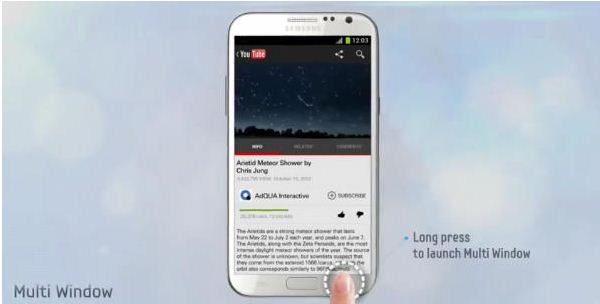
Multi Window - Just like what everyone saw with the Samsung Galaxy Note 10.1, the Samsung Galaxy Note 2 allows you to have two windows open on the screen at once. This allows users for example to view emails while watching a video or keeping a webpage open as you draw a picture or take down notes. The screen allows this to be completely viable and because of its hardware, you will notice no difficulty in doing this. 

Camera - Packed with an 8MP camera and equipped with the same accoutrements like autofocus and LED flash, the Samsung Galaxy Note 2's camera is still markedly better than its older predecessor the Samsung Galaxy Note. It also is equipped with BSI(Back Side Illumination) providing improved picture quality in low light conditions. This plus a ton of other features like tilt to zoom, best photos, Best group pose, burst shot and face detection make the Samsung Galaxy Note 2 a Camera Phone powerhouse. Overall quality of the pictures especially in ample lighting conditions are quite excellent. Recording of 1080p HD videos is pretty good and the 2MP front camera for video calls are at par with its other Flagship counterpart the Samsung Galaxy S3. 

Battery - This is what usually makes or breaks buyers from purchasing a product. With all the features that the Samsung Galaxy Note 2 offers at the table it is also packed with a pretty massive battery to match. The Samsung Galaxy Note 2 comes with a 3100mAh battery keeping the Samsung Galaxy Note charged for over a full day with heavy usage such as gaming, navigation, and web-browsing. More than that if you are an average user, and some have even reported that they have gone 4 days without having to plug to an outlet. 


Overall, the Samsung Galaxy Note 2 offers a pretty amazing range of improvements from the old Samsung Galaxy Note(Still can't believe and saying this one is old considering it was just last year and is still pretty good). Its bigger, bader and beefed up both feature-wise and software-wise. You can say that if you were considering to buy a tablet and a smartphone, this would be your natural choice to get for the price of one. A virtually a Go to Device for pretty much anything you would need from a smartphone and a tablet. If you think size is going to be an issue, I'd strongly recommend to try it on for size at your favorite retail outlets and I can assure you that you'd be walking out with one if not wishing that you could. 

Want to see more of the specs to help you with your purchasing choice check out the Samsung Galaxy Note 2 here: Samsung Galaxy Note 2

Till Next Time...

-Metz-